
How Do I Use My Amiibo Cards?
Scan, unlock, collect… Everything you need to know to get the most out of your amiibo cards and figures on Nintendo Switch, Wii U, and 3DS.
Did you receive amiibo cards as a gift, or buy some without really knowing how to use them? Don’t worry — you’re not alone! Amiibo are a Nintendo technology that’s both simple and powerful, but their operation can seem mysterious at first.
In this complete guide, we explain everything you need to know: the difference between cards and figures, how to scan them depending on your console, which games support them, and what rewards you can unlock.
Whether you’re a player of Animal Crossing, Zelda, Mario Kart, or Super Smash Bros., this article is for you. 🎮
Amiibo Cards vs. Figures: What’s the Difference?
Same technology, two different formats — everything you need to know before you start

Amiibo are Nintendo merchandise products that include an NFC chip (Near Field Communication). Whether in figure or card form, the principle is the same: bring the amiibo close to your console’s NFC reader, and special content is unlocked in your game.
🆚 Figures vs. Cards
The first official amiibo cards appeared with Animal Crossing: Happy Home Designer on 3DS in 2015. Since then, Nintendo has expanded the range to many series. Cards are often more affordable than figures, especially for rare characters.
How to Scan an Amiibo?
Step-by-step guide according to your Nintendo console

Scanning an amiibo is very simple once you know where the NFC reader is on your console. The location varies by model. Here is the complete guide according to your console.
Principle: NFC Approach
Hold your amiibo within 2 cm of your console’s NFC reader. Wait for the sound and on-screen confirmation. It’s that simple!
🎮 On Nintendo Switch
-
Launch your compatible game
Start the game and access the feature that requires an amiibo (often in menus or via an amiibo icon on screen).
-
Locate the NFC reader on the right Joy-Con
On the Nintendo Switch in TV or handheld mode, the NFC reader is located on the right analog stick of the right Joy-Con. Look for the small NFC symbol.
-
Place your amiibo on the stick
Bring the face of your card or the base of your figure close to the right stick. Hold for 1 to 2 seconds until the confirmation beep.
-
Enjoy the unlocked content!
An animation appears on screen to confirm the scan. The content is automatically added to your game.
The Nintendo Switch Lite does not have a built-in NFC reader in the Joy-Cons (they are fixed and non-NFC). To use amiibo on Switch Lite, you must buy an external USB NFC reader (about €20) or use a separate NFC-compatible Joy-Con.
🔴 On Nintendo 3DS / 2DS
-
Classic 3DS / 2DS
These models do not have a built-in NFC reader
. You need to buy the official Nintendo 3DS NFC Reader/Writer, which plugs into the console's IR port. -
New Nintendo 3DS / New 2DS XL
These "New" models have a built-in NFC reader under the bottom screen. Simply place your amiibo in the center at the bottom of the touchscreen.
🔵 On Wii U
-
Use the Wii U GamePad
The NFC reader is located in the bottom left corner
of the GamePad touchscreen. Place your amiibo on this area to scan it.
Switch (TV/handheld mode) : Right analog stick of the right Joy-Con.
Switch OLED : Same location as the standard Switch.
Switch Lite : External NFC reader required.
New 3DS / New 2DS XL: Center bottom of the lower screen.
Wii U: Bottom left corner of the GamePad.
Which Games Support Amiibo?
Over 200 games use amiibo technology — here are the most important ones

More than 200 Nintendo games support amiibo technology, each offering different content. Here are the most popular titles and what amiibo unlock in them.
🌟 Must-play games
📊 What amiibo unlock depending on the game
| Game | Type of unlocked content | Usage frequency |
|---|---|---|
| 🌿 Animal Crossing: New Horizons | Invite villagers to your island, photo backgrounds | Unlimited |
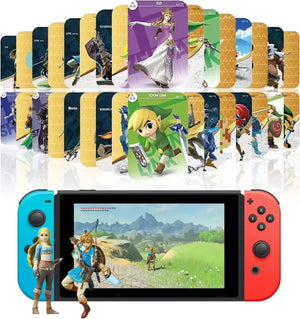
| ⚔️ Zelda: Breath of the Wild | Exclusive equipment, resources, mounts | 1x/day per amiibo |
| 👊 Super Smash Bros. Ultimate | Spirit figure, AI training character | Unlimited |
| 🍄 Super Mario Odyssey | Exclusive costumes, hidden Moons hints | 1x/day per amiibo |
| 🏎️ Mario Kart 8 Deluxe | Outfits and accessories for characters | 1x per amiibo |
| 🦔 Splatoon 3 | Character outfits, backgrounds, photo poses | 1x/day per amiibo |
| 🔗 Zelda: Tears of the Kingdom | Resources, equipment, rare materials | 1x/day per amiibo |
| 🌸 Kirby and the Forgotten Land | Stars and useful items | 1x/day per amiibo |
Nintendo updates the official list of all amiibo-compatible games on its site. You can also check Amiibo Life or Amiibo Wiki to see exactly which amiibo work with which game, and what they unlock specifically.
Types of Amiibo Rewards
Exclusive equipment, costumes, characters, resources… a complete overview
Depending on the game and the amiibo used, rewards can vary widely. Here are the main types of content you can unlock with your cards and figures.
Many games limit amiibo use to once per day. But if you have several different amiibo, you can scan them all on the same day! For example, in Zelda: BotW, scanning 10 different amiibo = 10 reward sets in one day.

Animal Crossing: New Horizons & Amiibo
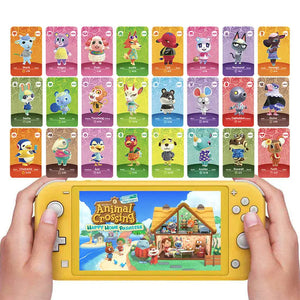
Animal Crossing: New Horizons is THE game where amiibo cards shine the most. Each card corresponds to a villager or character in the game and lets you invite them directly to your island without waiting for chance.
🏝️ What you can do with AC cards
- Invite a villager to the campsite: Scan a card with the Nook Phone (via the Island Management app) to invite that villager to stay at your island's campsite.
- Move in a villager: If a plot is free on your island, you can offer the villager at the campsite to settle there permanently.
- Replace an existing villager: If your island is full (10 villagers), invite a new villager to the campsite and ask someone to leave in exchange.
- Take photos with characters: Using the Camera app, scan a card to make that character appear on your island and take exclusive shots.
- Invite special characters: Characters like Isabelle, Tom Nook, Totoro also have their cards and offer unique interactions.
1. Open the Nook Phone → Island Management app.
2. Go to your island's campsite.
3. Use the call station and scan your amiibo card.
4. Invite the villager to join you — they will come to camp.
5. Come back the following days to invite them to settle permanently.
🃏 Animal Crossing card series
Cards from the older Series 1 to 4 (released in 2015 for New Leaf) are fully compatible with Animal Crossing: New Horizons. So you can find these cards secondhand at great prices and use them without any problem on your Nintendo Switch.
Pro Tips & Advice for your Amiibo
Secrets experienced collectors use every day
Scan multiple amiibo per day
The limit is per amiibo, not per player. With 10 different amiibo, you can claim 10 sets of daily rewards in Zelda or Kirby.
Set the date back
In most games, you can change the date in the system settings to "reset" the amiibo daily limit. Handy!
Protect your cards
Store your amiibo cards in protective sleeves or in a trading card binder. This way, they last for years without scratches.
Borrow from friends
If you don’t have a specific amiibo, ask a friend to lend it to you! The chip isn’t linked to a Nintendo account, anyone can scan it.
Buy secondhand
Amiibo cards from older series can be found at great prices on Vinted, eBay, or at flea markets. The figures too, often without boxes but fully functional.
Using the Amiibo app
The TagMo (Android) or Joy-Con Toolkit apps allow you to read and identify your amiibo via your smartphone's NFC.
In Super Smash Bros. Ultimate, your amiibo starts at level 1 and can level up to 50. The more you fight with it, the stronger it becomes and develops its own fighting habits. Some players create unbeatable amiibo by training them for weeks. A real fighting Tamagotchi!
Frequently Asked Questions about Amiibo
All the answers to your questions
Yes, exactly the same. Amiibo cards and figures use the same NFC technology and are completely interchangeable. The console makes no difference between a card amiibo and a figure amiibo of the same character. The format does not change the rewards obtained.
Amiibo are infinitely reusable. You can scan the same amiibo as many times as you want, in as many games as you wish. The only limit is in some games where you must wait 24 hours between two uses of the same amiibo (example: Zelda BotW for random gear).
No, not at all. Amiibo are not linked to a specific Nintendo account. Anyone can scan them on any compatible Nintendo console. So you can lend your amiibo to friends, borrow them, or buy them secondhand without any problem.
Some amiibo can store data directly on the NFC chip. In Super Smash Bros. Ultimate, your amiibo character (Figure Player) saves its level, stats, and fighting habits on the amiibo itself. This data is linked to the physical amiibo, not your console — so you can take your amiibo to a friend’s place and continue training it there.
There are blank NFC cards on which some players copy amiibo data. These DIY cards technically work because the console simply reads the NFC chip. However, Nintendo discourages this practice, which is in a legal gray area. Official cards remain the recommended solution to support creators and have a guaranteed quality product.
Official amiibo display the amiibo logo on the packaging, and the figures have the Nintendo logo printed on the base. To verify a card, the TagMo app (Android) can read the NFC chip and identify if the data matches an official amiibo. On the secondhand market, beware of unusually low prices for rare amiibo.
It depends on your games! If you play Animal Crossing, amiibo cards are extremely useful for choosing your villagers (and avoid weeks of random waiting). In Zelda BotW/TotK, some exclusive gear is highly sought after. In Smash Bros., Figure Players add a unique training dimension. For games like Mario Kart, the benefit is more cosmetic. Check what your game offers before buying.

Where to Buy Amiibo Cards & Figures?
Amiibo are available at many points of sale, both new and used. Here are the best sources depending on your budget and needs.
| Store | Type | Average card price | Average figure price |
|---|---|---|---|
| 🏪 Nintendo Store (France) | New, official | 3 – 5 € | 14 – 18 € |
| 🎮 Fnac | New, physical & online | 3 – 5 € | 13 – 22 € |
| 🎯 Micromania / GameStop | New & used | 2 – 5 € | 10 – 20 € |
| 📦 Amazon France | New & marketplace | 2 – 8 € | 12 – 40 € |
| ♻️ Vinted | Used, private sellers | 0,50 – 3 € | 5 – 15 € |
| 🌐 eBay France | New & used | 1 – 10 € | 5 – 60 € (depending on rarity) |
| 🏬 Flea markets / Secondhand sales | Used, rare | 0,20 – 2 € | 1 – 10 € (good deals) |
Some amiibo have become very rare (Inkling Girl, Pit, Little Mac from the 1st wave…) and sell for excessive prices. If you’re interested in an amiibo only for its in-game function , the used NFC cards are a perfect budget-friendly alternative — same functionality, much lower price.
Resources & Useful Links
🎮 Ready to Scan Your Amiibo?
Amiibo cards and figures are a fun and accessible way to enhance your Nintendo gaming experience. Whether it’s to unlock villagers in Animal Crossing, get exclusive gear in Zelda, or train your AI in Smash Bros., the possibilities are vast.
Now that you know how to scan them, which games support them, and what rewards await you, there is only one thing left to do…
Take out your cards, bring them close to the right Joy-Con, and enjoy! 🎴✨